 zAgentix
Version 0.2.5-alpha.2 · alpha · open source (Apache-2.0)
A coding agent on your own free chat.z.ai account.
It runs inside your own chat.z.ai session. No API key, no subscription, no zAgentix server.
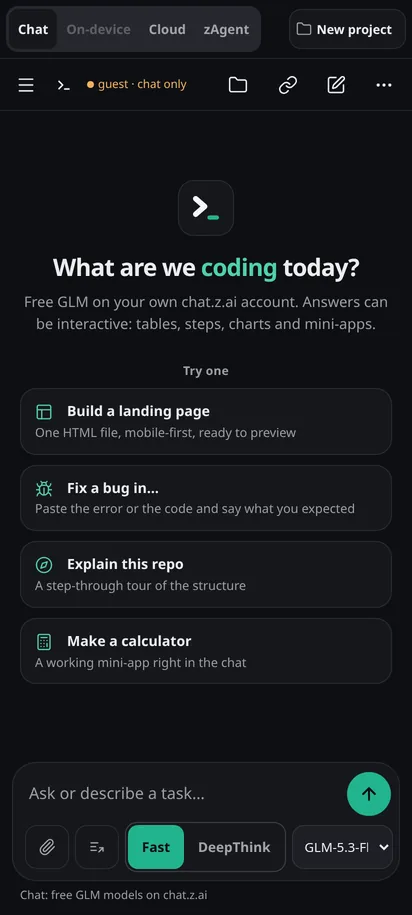
Four modes.
One project.
Chat, On-device, Cloud and zAgent share the same files, diffs and history.
Nothing on our servers.
Chats and files stay in the app on your device and in your own chat.z.ai account.
No API key.
No subscription.
Your free chat.z.ai account is enough. The code is open under Apache-2.0.
One more thing.
zAgentix is in closed beta.
Keys go out in small batches. Take yours while this batch is open.
Confirm it is you on Telegram.
Press the button, then Start in the chat. Your key appears here and in the chat.
Waiting for Telegram. This page updates by itself.
You are in.
Save the key: the app asks for it once, on first launch.
The download link works for 48 hours; the bot sent you the same key and link. Install steps are below.
What is in 0.2.5-alpha.2
What it does today.
Each line says how far it has been tested. "Tested in a simulator" means our automated tests against a stand-in for chat.z.ai, not real traffic.
Four modes, one project
Chat, On-device, Cloud and zAgent sit in one mode bar. The conversation and the files follow you when you switch.
Since 0.2.0 · mode bar captured live on chat.z.aiFast or DeepThink
One switch per chat. Fast answers straight away; DeepThink lets the model think first. Works in all four modes.
Since 0.2.4 · tested in a simulator; DeepThink in Cloud mode not yet checked on chat.z.aiAnother model takes over when one is busy
If the model is busy, rate-limited, fails or goes quiet, the same message goes to the next model, at most three tries. The answer says which model replied. Chat, On-device and zAgent.
New in 0.2.5 · tested in a simulator; real-traffic test pendingOr let it ask you first
Turn the automatic switch off in Settings, Chats. A small card offers Try next, Retry or Choose model, and moves on by itself after 10 seconds unless you cancel.
New in 0.2.5 · tested in a simulatorShare a session
Invite someone into your chat. You approve each guest; they see the answers as you do, and never the app's hidden instructions. Guests follow your Fast or DeepThink choice.
New in 0.2.5 · invite links fixed in alpha.2: tested end to end over the internet on one machine, not yet between two phoneszHelp, when something breaks
A Help and community entry in the side menu and in Settings, and a link on every error card, to the zHelp community.
New in 0.2.5 · link opening on a real phone not yet checkedFiles and diffs
Every file the agent writes lands in a file tree with per-file diffs. HTML pages preview in the app.
Since 0.1.xTools on your phone
In On-device mode the agent reads, writes and edits files in the app's own workspace. Every write asks you first.
Android app only
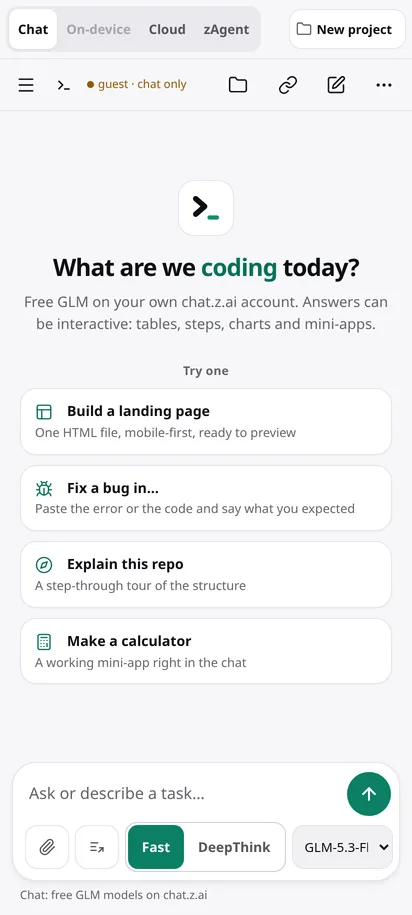
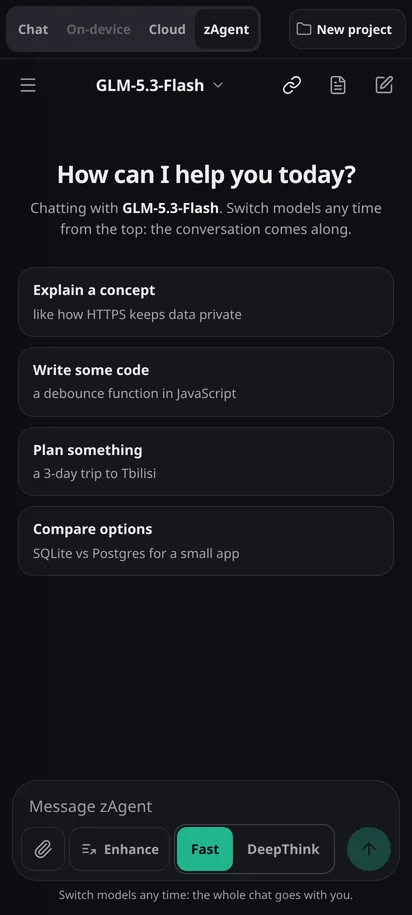
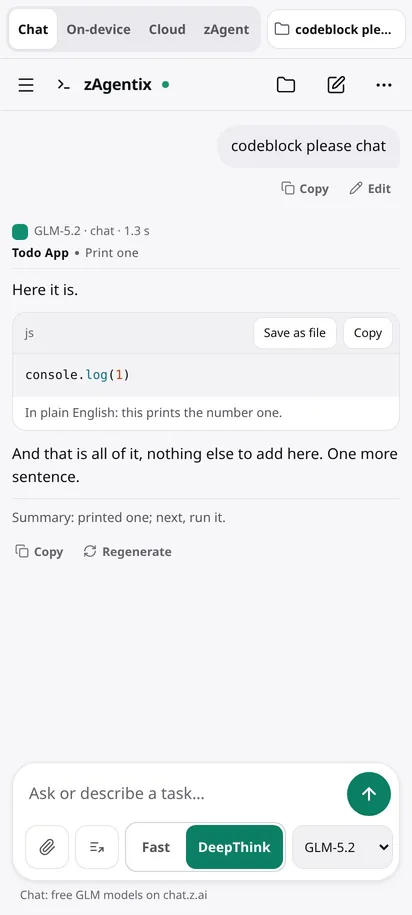
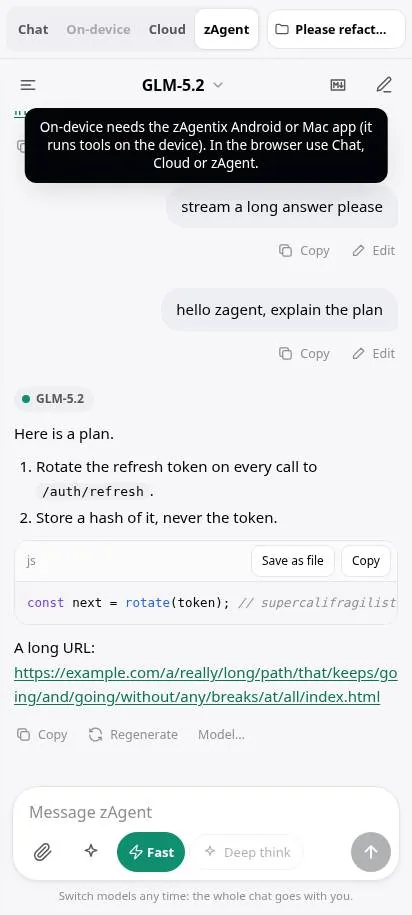
Phone-width captures (412 px). "Live" ones were taken today on chat.z.ai with 0.2.5-alpha.2; "test run" ones come from the project's automated tests with a simulated chat.z.ai.
Four modes
Pick the kind of help you need.
The mode bar sits at the top of every screen. The project button beside it opens your files.
Chat
Answers and code from GLM, streamed as they are written.
On-device
An agent that works on files in the app's workspace, with your approval for each write.
Cloud
chat.z.ai's own Full-Stack agent in a free cloud sandbox. Its files come back into your project. chat.z.ai picks the model here, so there is no model fallback.
zAgent
A chat-first workspace with a conversation drawer, search, pins and a live model picker.

Privacy
Your account, your device.
There is no zAgentix server. The app talks to chat.z.ai from your own device, in your own session, the same way the website does.
- Your own free accountSign in to chat.z.ai with Google or email, or try Chat as a guest. No API key, no card.
- Nothing stored on our serversChats and files stay in the app on your device and in your own chat.z.ai account. This site hosts the download, the browser script and the feedback form.
- Open source, Apache-2.0Plain JavaScript, no trackers. Read every line on GitLab and build the APK yourself.
- You approve what touches your deviceOn-device writes and shell commands ask first. Reads do not.
Your phone, Mac or browser
 ├─ zAgentix UI     the app
 └─ chat.z.ai page  your session
    signs requests, runs checks
         │
         ▼ HTTPS, your account
    chat.z.ai: GLM + sandbox

 zAgentix servers in the path:
 none
Download
Get the Android app.
Android 8.0 or newer. The APK is served from this site. It is not on Google Play, so Android asks you to allow the install once.
- Version
- 0.2.5-alpha.2 · released 2026-10-20
- File
- zAgentix-0.2.5-alpha.2.apk
- Size
- 4.3 MB (4,498,189 bytes)
- SHA-256
- ea030c39df9ed609a471bf9ad11fc5e2952105a9ed249cc6172abbdca6ae5cb1
- Signed by
- d397e44c41176e6da66abe35bea6f86e659ef3f3044fa911f42167df022a2d80
Certificate SHA-256. Every release is signed with this key, so a new version installs over the old one and keeps your data.
Install in four steps
- Tap Download and open the file when it finishes.Tap Download, fill in the short form and confirm it is you. You get a license key and the download link on the next screen.If your browser warns about APK files, choose Download anyway.
- Allow installs from this source.Android says your phone is not allowed to install unknown apps from this source. Tap Settings, turn on Allow from this source, then go back.
- Tap Install.Have an older zAgentix? This version installs over it.
- Open zAgentix, enter your license key and sign in to chat.z.ai.Google, email, or Guest for Chat only.
Check the file on a computer: sha256sum zAgentix-0.2.5-alpha.2.apk should print the SHA-256 above (also in zAgentix-0.2.5-alpha.2.apk.sha256). On macOS, build from source on GitLab.
Browser extensions
Install once. It opens on chat.z.ai by itself.
The extension adds zAgentix on top of your own signed-in chat.z.ai tab every time you open it. The app code is inside the extension (nothing is downloaded when it runs), and it can only see chat.z.ai. Free; not in the browser stores, so you load it in Developer mode. Version 0.2.5.2, app 0.2.5-alpha.2.
- File
- zAgentix-extension-0.2.5.2.zip
- SHA-256
- b313e9124d766081bd1ccc34cbcb8723aa9d45390504eff12734607f8846c85a
Tested in Chromium: starts by itself on chat.z.ai, stays off every other site, on/off switch works.
- Download the zip and unzip it.You get a folder named zAgentix-extension-0.2.5.2. Keep it: Chrome runs the extension from that folder.
- Open
chrome://extensionsType it into the address bar. - Turn on Developer mode.Switch at the top right.
- Click Load unpacked and pick the folder.Then open chat.z.ai and sign in. zAgentix opens by itself.
- File
- zAgentix-extension-0.2.5.2.zip
- SHA-256
- b313e9124d766081bd1ccc34cbcb8723aa9d45390504eff12734607f8846c85a
Same package as Chrome. Not yet tried in Edge itself.
- Download the zip and unzip it.You get a folder named zAgentix-extension-0.2.5.2. Keep it: Edge runs the extension from that folder.
- Open
edge://extensionsType it into the address bar. - Turn on Developer mode.Switch in the left panel (open the menu on a narrow window).
- Click Load unpacked and pick the folder.Then open chat.z.ai and sign in. zAgentix opens by itself.
- File
- zAgentix-extension-0.2.5.2.zip
- SHA-256
- b313e9124d766081bd1ccc34cbcb8723aa9d45390504eff12734607f8846c85a
Same package as Chrome. Not yet tried in Brave itself.
- Download the zip and unzip it.You get a folder named zAgentix-extension-0.2.5.2. Keep it: Brave runs the extension from that folder.
- Open
brave://extensionsType it into the address bar. - Turn on Developer mode.Switch at the top right.
- Click Load unpacked and pick the folder.Then open chat.z.ai and sign in. zAgentix opens by itself.
- File
- zAgentix-extension-0.2.5.2.zip
- SHA-256
- b313e9124d766081bd1ccc34cbcb8723aa9d45390504eff12734607f8846c85a
Same package as Chrome. Not yet tried in Opera itself.
- Download the zip and unzip it.You get a folder named zAgentix-extension-0.2.5.2. Keep it: Opera runs the extension from that folder.
- Open
opera://extensionsType it into the address bar. - Turn on Developer mode.Switch at the top right.
- Click Load unpacked and pick the folder.Then open chat.z.ai and sign in. zAgentix opens by itself.
- File
- zAgentix-extension-0.2.5.2-firefox.zip
- SHA-256
- 8b5ff964338ebb526175ea0faa43743148ab784432b505f27b1d91b6c74bb1b0
Firefox 128 or newer. Not tested in Firefox yet.
- Download the zip. Do not unzip it.
- Open
about:debugging#/runtime/this-firefox - Click Load Temporary Add-on and pick the zip.
- Open chat.z.ai.If nothing appears, click the zAgentix button in the toolbar and choose Allow on chat.z.ai.
Firefox removes a temporary add-on when it restarts, so you repeat steps 2 and 3. A permanent install needs the file signed by Mozilla, which we have not done yet. For a lasting setup today, use the userscript under Safari with Tampermonkey or Violentmonkey.
- File
- zagentix-0.2.5.2.user.js
- SHA-256
- d01754a9ebb68c20244435e999649ccbb15de0ecf4da169ffaefd81e72c017f1
Script tested on chat.z.ai in Chromium. Not tested in Safari yet.
- Install the free Userscripts app from the App Store.Mac, iPhone and iPad.
- Turn it on in Safari's extension settings and allow it on chat.z.ai.Mac: Safari, Settings, Extensions. iPhone: Settings, Apps, Safari, Extensions.
- Open the userscript link in Safari, tap the Userscripts button and choose Install.
- Open chat.z.ai. zAgentix opens by itself.
A full Safari extension needs a Mac build and Apple's paid developer account, so for now Safari uses this userscript. The same file works in Tampermonkey or Violentmonkey on any browser.
No extension? The bookmark still works on any browser, phones included.
In your browser
Run it in a browser tab.
The browser version is the same app code. It runs inside your own chat.z.ai tab, so you sign in there as usual and your session stays in that tab. The easiest way is the browser extension; a bookmark works too, phones included. Chat, Cloud and zAgent work in the browser; On-device needs the app.
One-time setup, about a minute. Checked today on live chat.z.ai as a guest: the app loads and a message goes out. When chat.z.ai shows its slider check, you solve it; the answer after the slider has not been checked by our tests yet.
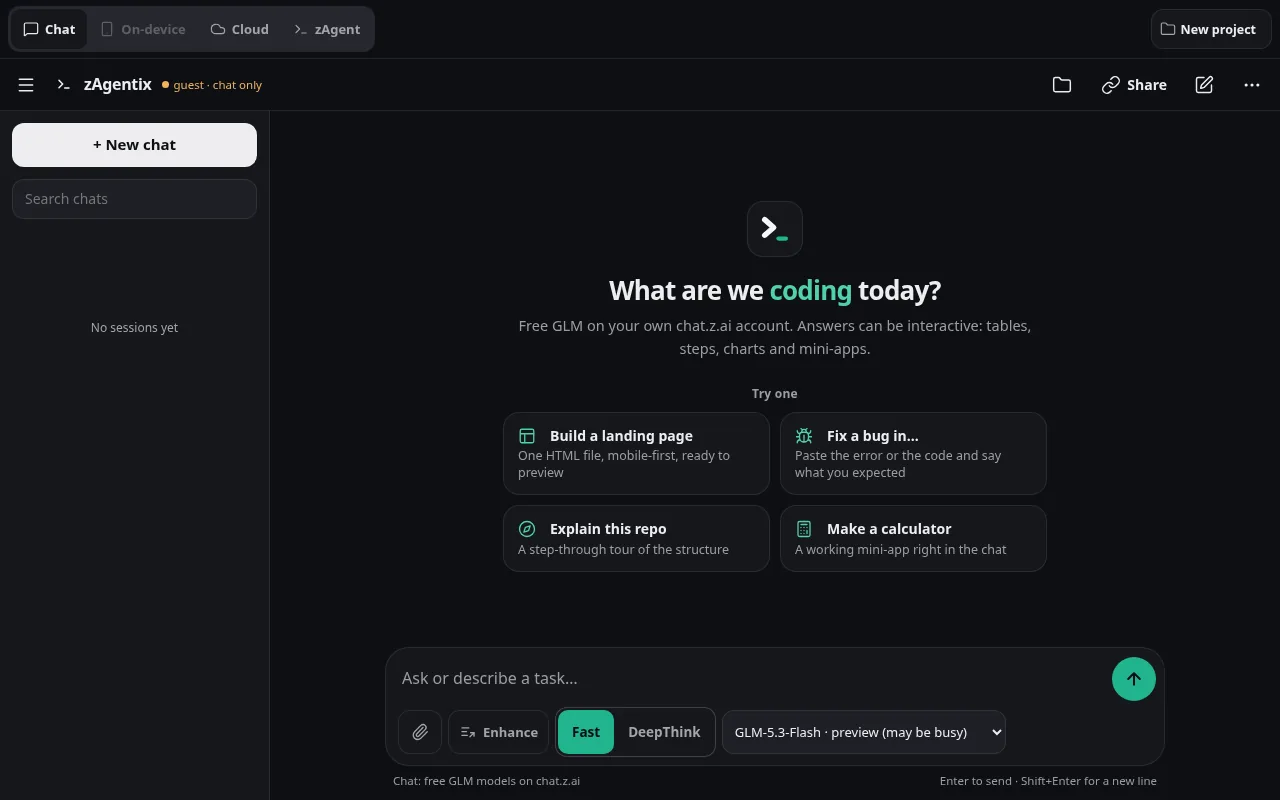
Feedback
Tell us what to fix next.
Bugs, ideas, anything. It goes to the developer by email. Name and email are optional; leave an email if you want a reply.