 zAgentix
Version 0.2.5-alpha.2 · same code as the Android app
zAgentix in your browser.
It runs inside your own chat.z.ai tab, on a phone or a computer. You sign in on chat.z.ai as usual, with Google, email or as a guest, and zAgentix opens on top. Your session never leaves that tab.
On a computer, the extension is the easy way: install once and zAgentix opens by itself every time you open chat.z.ai. Chrome, Edge, Brave, Opera, Firefox and Safari.
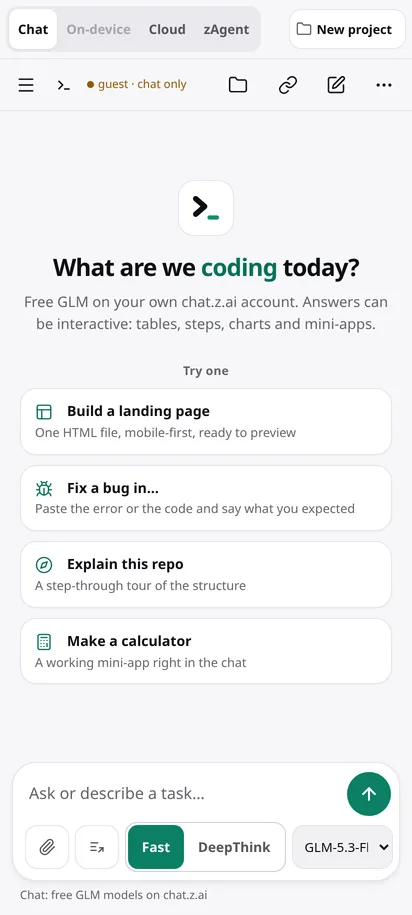
Pick your device.
On a computer, use the browser extension. The bookmark is the fallback: it works on any browser, phones included, but you tap it each time.
Browser extensionRECOMMENDED
Install once. Every time you open chat.z.ai, zAgentix opens on top by itself. Chrome, Edge, Brave, Opera, Firefox, and Safari through a userscript.
BookmarkNO INSTALL
Drag this button to your bookmarks bar. Then open chat.z.ai and click the bookmark. Click it again after you reload the page.
Userscript
Starts zAgentix by itself every time you open chat.z.ai. Needs a userscript manager such as Tampermonkey or Violentmonkey (Chrome, Edge, Firefox), or the free Userscripts app in Safari. The app code is inside the script.
Bookmark in ChromeNO INSTALL
- Copy the loader.
- Bookmark this page (menu, then the star), then edit that bookmark.Name it zx, and paste the loader into the URL field. Save.
- Open chat.z.ai, tap the address bar and type zx.Tap the zx bookmark in the list (the one with the star). zAgentix opens.
Userscript in Firefox
Firefox for Android can run Tampermonkey or Violentmonkey. Add one from Firefox's add-ons, then install the script. It starts by itself on chat.z.ai.
Want On-device mode, which runs tools on your phone? That needs the Android app.
Bookmark in SafariNO INSTALL
- Copy the loader.
- Bookmark this page (Share, then Add Bookmark), then edit it in Bookmarks.Name it zAgentix and paste the loader into the address. Save.
- Open chat.z.ai, then open Bookmarks and tap zAgentix.
Userscript
With a Safari userscript extension (for example the free "Userscripts" app), install the script once and it starts by itself.
Show the loader code
It checks that you are on chat.z.ai, then loads zagentix-web.js from this site. That file is the app's open-source code, built from the core folder on GitLab.
New in 0.2.5-alpha.2: another model takes over when one is busy, an Ask me option, and zHelp links. These are tested in a simulator. Share session is in the Android app as a preview; in the browser build it has not been tested.
Good to know
Why not a normal web page?
chat.z.ai signs every chat request with code inside its own page and sometimes shows a slider check. A separate website cannot do either, so it could not talk to chat.z.ai without copying your session to a server. Running inside the chat.z.ai tab avoids that: the page signs its own requests, and you solve its checks yourself.
Is my login safe?
You sign in on chat.z.ai itself. zAgentix never asks for your password or token, and nothing is sent to us. The loader does give this site's script access to your chat.z.ai tab, the same trust you give the Android app, so the code is open for anyone to read.
The security check appeared. What now?
chat.z.ai sometimes asks you to drag a slider. zAgentix steps aside and shows the page so you can solve it. Our tests confirm that hand-over on live chat.z.ai; the answer that follows the slider has not been checked by our tests yet, so tell us through the feedback form if it gets stuck.
How do I get back to the plain chat.z.ai page?
Open the side menu in zAgentix and choose Show chat.z.ai, or just reload the page. With the bookmark, tap it again to bring zAgentix back.
Does it update?
Yes. The loader always fetches the current version from this site, so there is nothing to reinstall.