 zAgentix
Android 0.3.2 · Mac 0.3.1 · in testing · open source (Apache-2.0)
A coding agent on your own free chat.z.ai account.
It runs inside your own chat.z.ai session. No API key, no subscription, no zAgentix server.
39 seconds, no sound. Filmed with an earlier 0.2 build on Android and Mac; since 0.2.8 Cloud lives inside Chat.
Three modes.
One project.
Chat, On-device and zAgent share the same files, diffs and history. chat.z.ai's cloud agent now runs from Chat.
Nothing on our servers.
Chats and files stay in the app on your device and in your own chat.z.ai account.
No API key.
No subscription.
Your free chat.z.ai account is enough. The code is open under Apache-2.0.
One more thing.
zAgentix is in closed beta.
Downloads go out in small batches. Leave your name and email and the download starts.
This batch is closed.
Keep checking for the next one.
Your download is starting.
If nothing happens, tap the button.
The link works for 48 hours. Install steps are below.
Release notes / roadmap
0.3.2 now, 0.3.3 next.
0.3.2 is an intermediate update for Android. It brings together the improvements that are ready today. The larger 0.3.3 update follows. No date is set.
0.3.2 — intermediate update (Android)
- Cleaner look. A new layout with five settings groups and 44px tap targets.
- Stop, updated for chat.z.ai's new controls. Tested: Stop, then a new chat, then a message - automated tests plus one live run. Stop, then the same chat: NOT CHECKED live yet.
- Smoother streaming. Stream-safe Markdown, so formatting holds while a reply is still coming in.
- Model fallback note (Chat mode). When a reply switches model mid-way, a note says so, with Change model and Retry. In zAgent the live notice is not visible yet; it comes in 0.3.3.
- Message box. Resets after you send.
- Longer instructions. Custom instructions up to 64,000 characters and Story notes up to 8,000. Longer text takes the agent more time to process and very long text can be shortened, so a note shows the size. Keep them focused for faster replies.
- zAgent. Menu and share fixes.
- Anti-slop writing rule. Optional, with a switch in Settings.
Checked with automated tests plus one live run. Not yet validated on a phone by us. Live Stop-then-same-chat and live anti-slop are still being checked. Android only; Mac and the extension stay on 0.3.1 until 0.3.3.
0.3.3 — the big update (coming, no date set)
- Self-healing. zAgentix adapts when chat.z.ai changes its page.
- Clear busy message. A calm "chat.z.ai is busy or limiting guests" message instead of misleading errors.
- Stop on Mac and the extension. The Stop fix comes to the Mac app and the browser extension.
- zAgent fallback note. zAgent mode shows the fallback note while it is still replying.
- Projects. Put chats into folders or categories, like the new chat.z.ai.
- Exact build number. The About screen shows it.
Planned for Android, Mac and the browser extension. Plans can change; this list will be updated when 0.3.3 ships.
What is in 0.3.2
What it does today.
Each line says how far it has been tested. "Tested in a simulator" means our automated tests against a stand-in for chat.z.ai, not real traffic.
New in 0.3.2 (Android only)
A cleaner look, Stop updated for chat.z.ai's new controls, smoother streaming and longer custom instructions. The full list is under Release notes / roadmap, with what comes next in 0.3.3.
New in 0.3.1.1 (Android only)
- Stop, updated for chat.z.ai's Oct 23 page change. chat.z.ai changed its page on Oct 23 and zAgentix could no longer find its Stop control; 0.3.1.1 finds the new one. Mac and the browser extension are still 0.3.1.
Checked with our automated tests against a stand-in for chat.z.ai (83/83) and one live run on chat.z.ai: Stop, then a new chat, then a message. No on-device validation has been completed by us. Everything else is the same as 0.3.1.
New in 0.3.1
- Keep alive (Android). An optional switch asks Android, through its own Allow dialog, to stop limiting zAgentix in the background. That makes it less likely Android closes it during a long task; some phone makers add their own battery managers on top.
- Smoother phone hand-off. When a task needs you or another app, a short card with one Switch app button. zAgentix waits with one notification and carries on when the app it needs is on screen or when you come back. Stop is always there.
- Live status over other apps (Android). During a phone task, a small pill shows what the agent is doing, with Stop; tap it to go back to zAgentix. It uses the Phone control service you already turned on, no new permission.
- Screen reading fallback. If the model cannot read the screen, phone control tries a chain of free readers. The last one is an optional on-device vision model: a 195 MB download, off until you choose it, and it asks first.
- Google sign-in (Android). Continue with Google now picks the route that should work on your phone, in the app or in Chrome, before you tap, and switches to Chrome by itself if Google refuses the in-app page.
- Session sharing. A guest whose message is waiting for the host now sees "Waiting for the host…".
- 32-bit Android, beta. A separate build for older 32-bit phones, not yet tested on a real 32-bit phone. Most phones should use the main download.
The phone features above passed our automated tests; not all of them have been checked on every real phone yet.
Also in 0.3.1, first shipped with this release
- Agent modes. The On-device agent shows its plan first (Approve, Edit or Cancel), counts its steps, and has Pause and Resume next to Stop.
- Phone control. On Android, and from the Mac app or the browser extension with your phone connected. Off until you turn it on, works only during a task you started, asks before risky steps, and a Stop button is always on screen.
- Install, only if you allow it. Letting zAgentix tap Install for free apps is off by default, and it asks every time.
- Mac. Sign in to chat.z.ai through your browser, safer links and clipboard, and the same app code as Android 0.3.1.
- Safer extension. The extension reads a page only on sites you approved in zAgentix. Local API is now off by default.
0.2.8.6 added: PDFs from Google Docs, Word, Chrome and LibreOffice read correctly, attached files' text kept on a new Chat task, scanned PDFs sent as page images.
New in 0.2.8
- Cloud merged into Chat. No separate Cloud tab: chat.z.ai's cloud agent runs from Chat, and old Cloud chats carry on there.
- Automatic chat import. Your chat.z.ai history shows up in the side menu by itself once you are signed in.
- Custom instructions. Write them once in Settings, Chats, for every message or for one chat.
- One-tap API presets. Quick start for Agnes, Qwen and DeepSeek with your own key.
- Upload and sign-in fixes. A clear Sign in button shows whether you are signed in; images and files attach in all three modes.
- SVG preview. SVG code gets a Preview button that draws the image in the chat, with scripts blocked.
- Discord community. Help and chat with other users on the zAgentix Discord, also linked in Settings, Help.
Tested with our automated tests against a stand-in for chat.z.ai. Mac 0.3.1 has the same app code as Android 0.3.1.
Three modes, one project
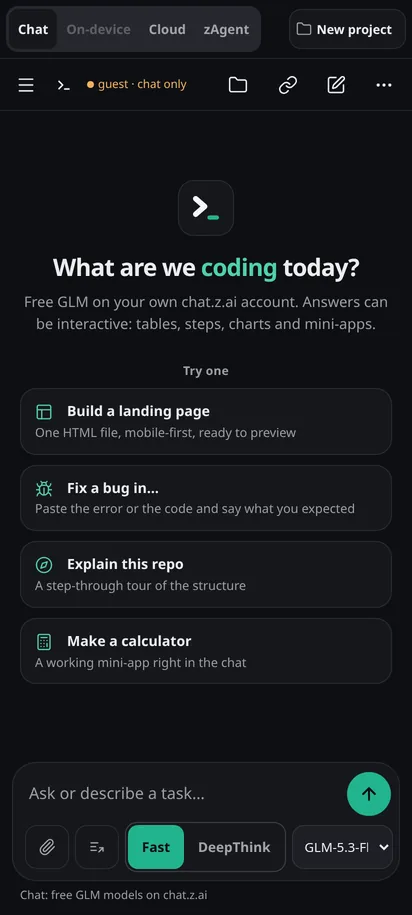
Chat, On-device and zAgent sit in one mode bar. The conversation and the files follow you when you switch.
Since 0.2.0 · Cloud folded into Chat in 0.2.8Fast or DeepThink
One switch per chat. Fast answers straight away; DeepThink lets the model think first. Works in all three modes.
Since 0.2.4 · tested in a simulator; DeepThink with chat.z.ai's cloud agent not yet checked on chat.z.aiAnother model takes over when one is busy
If the model is busy, rate-limited, fails or goes quiet, the same message goes to the next model, at most three tries. The answer says which model replied. Chat, On-device and zAgent.
Since 0.2.5 · tested in a simulator; real-traffic test pendingOr let it ask you first
Turn the automatic switch off in Settings, Chats. A small card offers Try next, Retry or Choose model, and moves on by itself after 10 seconds unless you cancel.
Since 0.2.5 · tested in a simulatorShare a session
Invite someone into your chat. You approve each guest; they see the answers as you do, and never the app's hidden instructions. Guests follow your Fast or DeepThink choice.
Since 0.2.5 · invite links fixed in alpha.2: tested end to end over the internet on one machine, not yet between two phoneszHelp, when something breaks
A Help and community entry in the side menu and in Settings, and a link on every error card, to the zHelp community.
Since 0.2.5 · link opening on a real phone not yet checkedFiles and diffs
Every file the agent writes lands in a file tree with per-file diffs. HTML pages preview in the app.
Since 0.1.xTools on your phone
In On-device mode the agent reads, writes and edits files in the app's own workspace. Every write asks you first.
Android app only
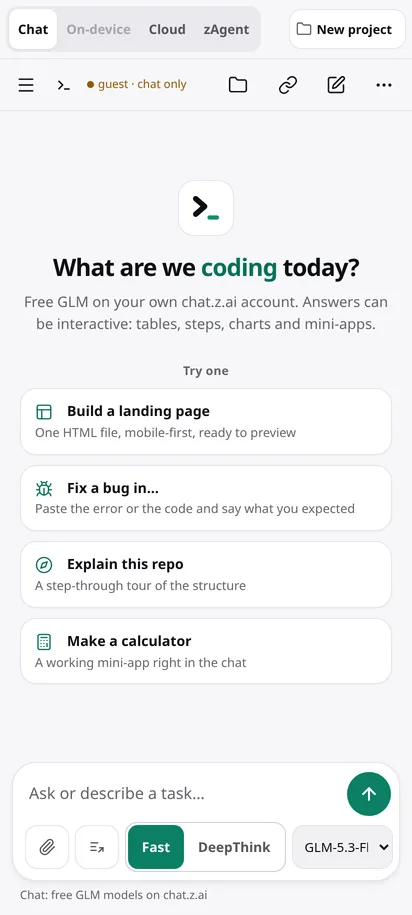
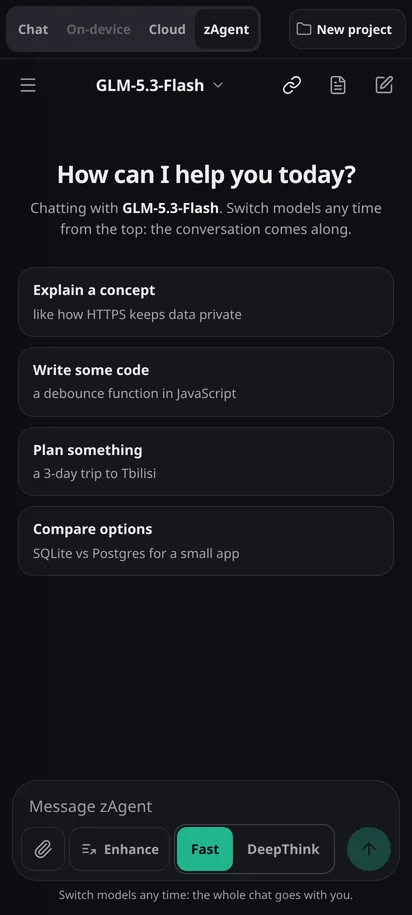
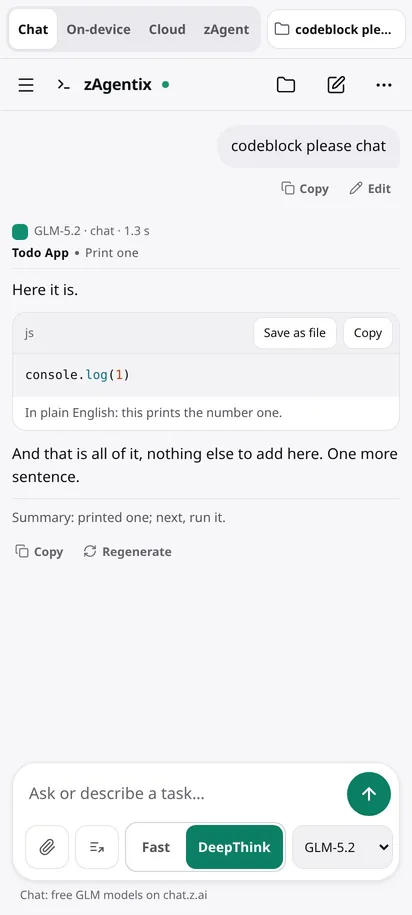
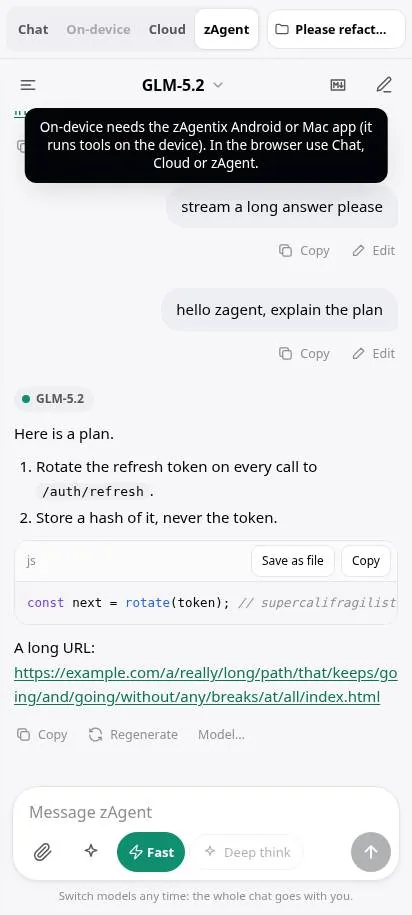
Phone-width captures (412 px). "Live" ones were taken on chat.z.ai with an earlier 0.2 build; "test run" ones come from the project's automated tests with a simulated chat.z.ai.
Three modes
Pick the kind of help you need.
The mode bar sits at the top of every screen. The project button beside it opens your files.
Chat
Answers and code from GLM, streamed as they are written. Since 0.2.8 it also runs chat.z.ai's own Full-Stack agent in a free cloud sandbox (sign-in needed), and those files come back into your project.
On-device
An agent that works on files in the app's workspace, with your approval for each write.
Cloud
chat.z.ai's own Full-Stack agent in a free cloud sandbox. Its files come back into your project. chat.z.ai picks the model here, so there is no model fallback.
zAgent
A chat-first workspace with a conversation drawer, search, pins and a live model picker.

Privacy
Your account, your device.
There is no zAgentix server. The app talks to chat.z.ai from your own device, in your own session, the same way the website does.
- Your own free accountSign in to chat.z.ai with Google or email, or try Chat as a guest. No API key, no card.
- Nothing stored on our serversChats and files stay in the app on your device and in your own chat.z.ai account. This site hosts the download, the browser script and the feedback form.
- Open source, Apache-2.0Plain JavaScript, no trackers. Read every line on GitLab and build the APK yourself.
- You approve what touches your deviceOn-device writes and shell commands ask first. Reads do not.
Your phone, Mac or browser
 ├─ zAgentix UI     the app
 └─ chat.z.ai page  your session
    signs requests, runs checks
         │
         ▼ HTTPS, your account
    chat.z.ai: GLM + sandbox

 zAgentix servers in the path:
 none
Download
Get the app.
For Android and Mac. Neither is in an app store, so your phone or Mac asks you to allow it once.
Android
Android 8.0 or newer. Both APKs download from GitLab (64-bit, 32-bit beta); copies are also on this site (64-bit, 32-bit beta).
Beta: not yet tested on a real 32-bit phone.
Not sure which? Use the main one. The 32-bit one is only for older phones that the main one won't install on.
- Version
- 0.3.2 · released 2026-10-23
- 64-bit
- zAgentix-0.3.2.apk · build 39 · 4.8 MB (5,081,558 bytes)
0f3f555379875d32f7bf3ff629b151f1023b4e2e7cabff1127276dc2665c508a - 32-bit (beta)
- zAgentix-0.3.2-armv7.apk · build 38 · 4.2 MB (4,454,878 bytes)
cb6b34df00156dc4ac869e12c007e28844d0ed33f377a564366205c3e6ec6db0 - Signed by
- d397e44c41176e6da66abe35bea6f86e659ef3f3044fa911f42167df022a2d80
Certificate SHA-256. Every release is signed with this key, so a new version installs over the old one and keeps your data.
Install in four steps
- Tap Download and open the file when it finishes.Tap Download, enter your name and email, and tap Download again. The file starts downloading.If your browser warns about APK files, choose Download anyway.
- Allow installs from this source.Android says your phone is not allowed to install unknown apps from this source. Tap Settings, turn on Allow from this source, then go back.
- Tap Install.Have an older zAgentix? This version installs over it.
- Open zAgentix and sign in to chat.z.ai.Google, email, or Guest for Chat only.
Check the file on a computer: sha256sum zAgentix-0.3.2.apk should print the SHA-256 above (also in zAgentix-0.3.2.apk.sha256; 32-bit beta: zAgentix-0.3.2-armv7.apk.sha256).
Older Android versions: 0.3.1.1 (64-bit, 32-bit beta) and 0.3.1 (64-bit, 32-bit beta).
macOS
macOS 13 or newer. The same app code as Android 0.3.1, as a native Mac window. The zips are hosted on GitLab.
Ad-hoc signed, not notarized. Drag it to Applications. The first time, right-click zAgentix and choose Open. If macOS says it "is damaged", open Terminal and run xattr -cr /Applications/zAgentix.app, then open it again.
- Version
- 0.3.1
- Apple silicon
- zAgentix-0.3.1-mac-arm64.zip · 123 MB (129,297,557 bytes)
de7fe27f231b6b8369a59a62b7dcff1d60f46c0cae180bb92c4e990a4eaf96fe - Intel
- zAgentix-0.3.1-mac-x64.zip · 129 MB (134,948,201 bytes)
1fd94e9fe7ad6e18cbb705e45382a0f35638079cdd5c40d46e9032049a3b58cb
Install in four steps
- Download the zip for your Mac and open it.Not sure which? Apple menu, About This Mac: "Chip Apple M…" is Apple silicon, "Processor Intel" is Intel.
- Drag zAgentix into Applications.
- First launch: right-click zAgentix, choose Open, then Open again.The app is not signed with an Apple developer certificate, so a plain double-click is blocked the first time. On macOS 15 or newer, if there is no Open button: System Settings, Privacy & Security, Open Anyway. After that it opens normally.
- Sign in to chat.z.ai.Google, email, or Guest for Chat only.
If macOS says the app "is damaged", run xattr -dr com.apple.quarantine /Applications/zAgentix.app once in Terminal. Check a file: shasum -a 256 zAgentix-0.3.1-mac-arm64.zip should print the SHA-256 above. Both checksums: zAgentix-0.3.1-mac.sha256.
Browser extensions
Install once. It opens on chat.z.ai by itself.
The extension adds zAgentix on top of your own signed-in chat.z.ai tab every time you open it. The app code is inside the extension (nothing is downloaded when it runs). It sees only chat.z.ai until you approve another site in zAgentix, one site at a time. Free; not in the browser stores, so you load it in Developer mode. Version 0.3.1, app 0.3.2.
- File
- zAgentix-extension-0.3.1.zip
- SHA-256
- 775236056029962ba3f4be464bad2040d4aed087659ed9166ed58b4923805765
Tested in Chromium: starts by itself on chat.z.ai, stays off every other site, on/off switch works.
- Download the zip and unzip it.You get a folder named zAgentix-extension-0.3.1. Keep it: Chrome runs the extension from that folder.
- Open
chrome://extensionsType it into the address bar. - Turn on Developer mode.Switch at the top right.
- Click Load unpacked and pick the folder.Then open chat.z.ai and sign in. zAgentix opens by itself.
- File
- zAgentix-extension-0.3.1.zip
- SHA-256
- 775236056029962ba3f4be464bad2040d4aed087659ed9166ed58b4923805765
Same package as Chrome. Not yet tried in Edge itself. Edge Add-ons format (flat zip): zAgentix-extension-0.3.1-edge.zip · 5135 KB
a03a33d276edbf89ea124359703034e3a26d26a3f89109aec335272ffd2511e1
- Download the zip and unzip it.You get a folder named zAgentix-extension-0.3.1. Keep it: Edge runs the extension from that folder.
- Open
edge://extensionsType it into the address bar. - Turn on Developer mode.Switch in the left panel (open the menu on a narrow window).
- Click Load unpacked and pick the folder.Then open chat.z.ai and sign in. zAgentix opens by itself.
- File
- zAgentix-extension-0.3.1.zip
- SHA-256
- 775236056029962ba3f4be464bad2040d4aed087659ed9166ed58b4923805765
Same package as Chrome. Not yet tried in Brave itself.
- Download the zip and unzip it.You get a folder named zAgentix-extension-0.3.1. Keep it: Brave runs the extension from that folder.
- Open
brave://extensionsType it into the address bar. - Turn on Developer mode.Switch at the top right.
- Click Load unpacked and pick the folder.Then open chat.z.ai and sign in. zAgentix opens by itself.
- File
- zAgentix-extension-0.3.1.zip
- SHA-256
- 775236056029962ba3f4be464bad2040d4aed087659ed9166ed58b4923805765
Same package as Chrome. Not yet tried in Opera itself.
- Download the zip and unzip it.You get a folder named zAgentix-extension-0.3.1. Keep it: Opera runs the extension from that folder.
- Open
opera://extensionsType it into the address bar. - Turn on Developer mode.Switch at the top right.
- Click Load unpacked and pick the folder.Then open chat.z.ai and sign in. zAgentix opens by itself.
- File
- zAgentix-extension-0.3.1-firefox.zip
- SHA-256
- c32f5d1929d45abee0c3e18c86a855930777f311fa96d9e98dfcd02b1df446f4
Firefox 128 or newer. Not tested in Firefox yet.
- Download the zip. Do not unzip it.
- Open
about:debugging#/runtime/this-firefox - Click Load Temporary Add-on and pick the zip.
- Open chat.z.ai.If nothing appears, click the zAgentix button in the toolbar and choose Allow on chat.z.ai.
Firefox removes a temporary add-on when it restarts, so you repeat steps 2 and 3. A permanent install needs the file signed by Mozilla, which we have not done yet. For a lasting setup today, use the userscript under Safari with Tampermonkey or Violentmonkey.
- File
- zagentix-0.3.1.user.js
- SHA-256
- 43d5dd1bd3bcdb4c5415797b1d6b2b4637055c1bcafcba8c706472983b535394
Script tested on chat.z.ai in Chromium. Not tested in Safari yet.
- Install the free Userscripts app from the App Store.Mac, iPhone and iPad.
- Turn it on in Safari's extension settings and allow it on chat.z.ai.Mac: Safari, Settings, Extensions. iPhone: Settings, Apps, Safari, Extensions.
- Open the userscript link in Safari, tap the Userscripts button and choose Install.
- Open chat.z.ai. zAgentix opens by itself.
A full Safari extension needs a Mac build and Apple's paid developer account, so for now Safari uses this userscript. The same file works in Tampermonkey or Violentmonkey on any browser.
No extension? The bookmark still works on any browser, phones included.
In your browser
Run it in a browser tab.
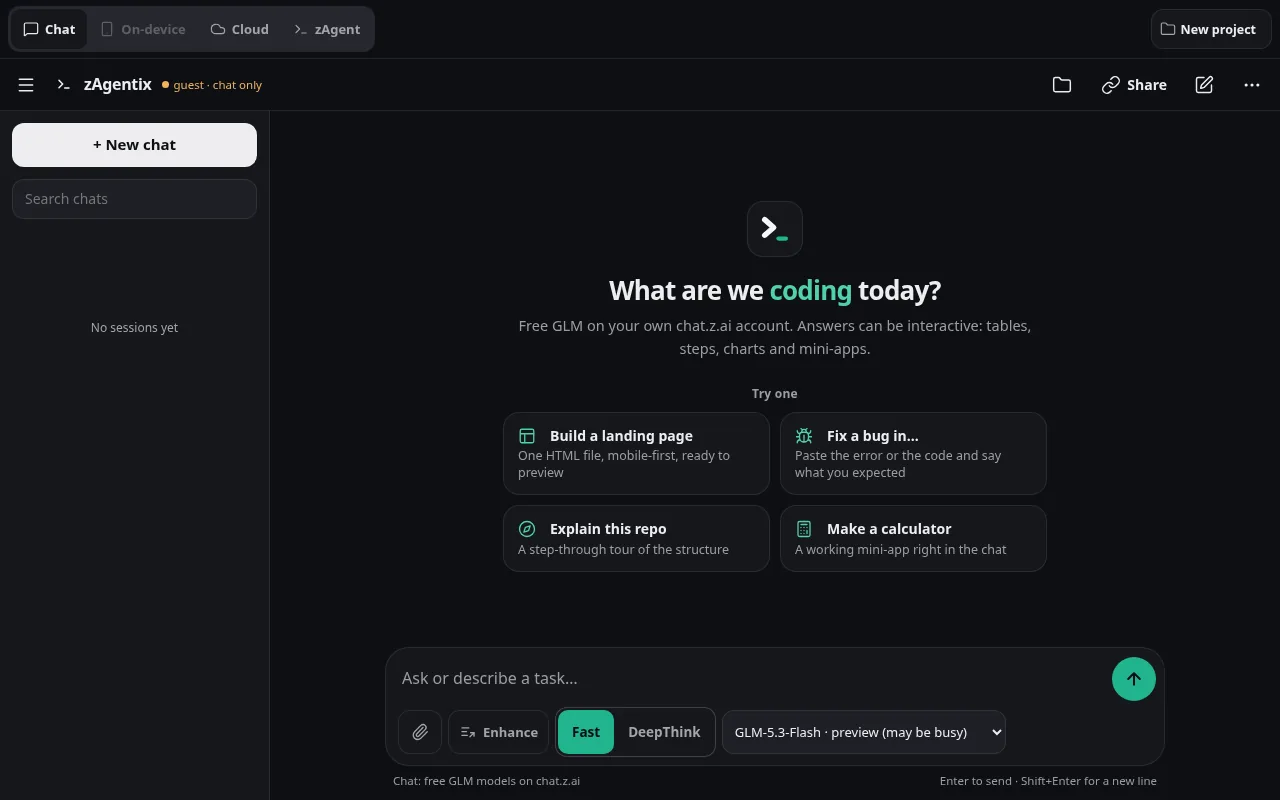
The browser version is the same app code. It runs inside your own chat.z.ai tab, so you sign in there as usual and your session stays in that tab. The easiest way is the browser extension; a bookmark works too, phones included. The browser version is 0.3.1: Chat and zAgent work there; On-device needs the app.
One-time setup, about a minute. Checked today on live chat.z.ai as a guest: the app loads and a message goes out. When chat.z.ai shows its slider check, you solve it; the answer after the slider has not been checked by our tests yet.
Feedback
Tell us what to fix next.
Bugs, ideas, anything. It goes to the developer by email. Name and email are optional; leave an email if you want a reply.